
TikTok Photo Downloader
This TikTok photo downloader saves every slideshow photo as a full-size JPG. Video MP4s and MP3s too. Free, unlimited, no app, no sign-up.
What you get
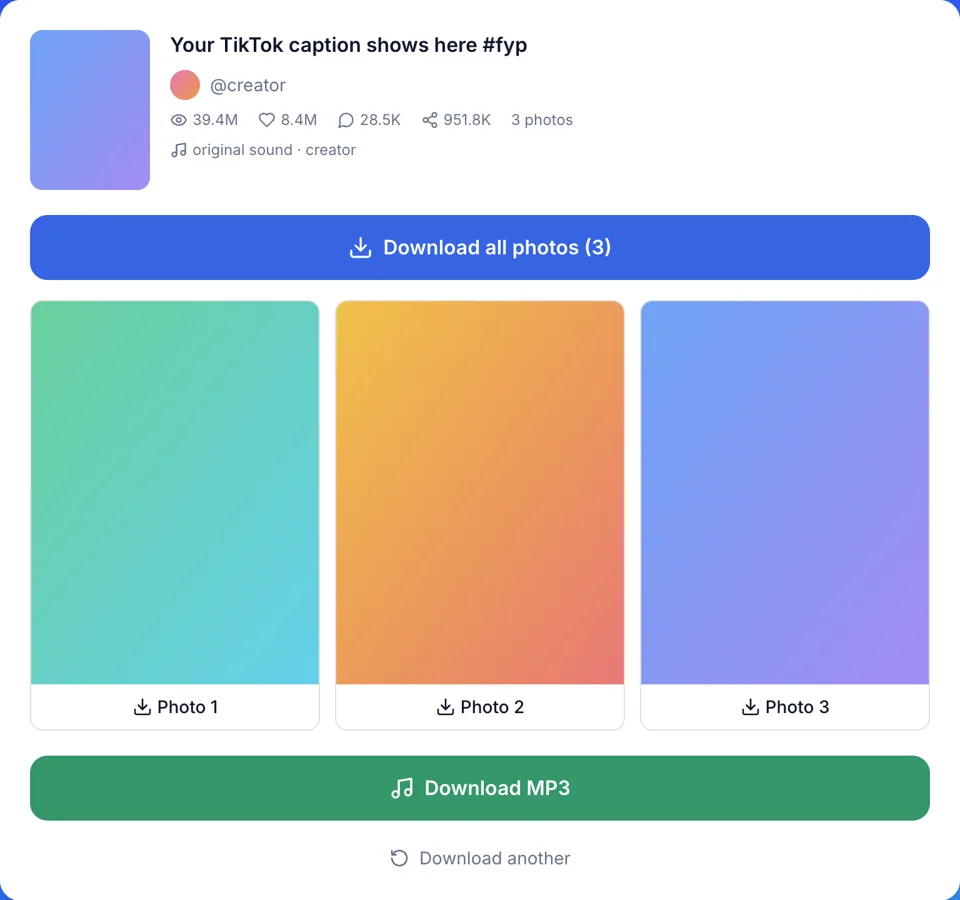
How to download TikTok photos in three steps
The TikTok photo downloader works the same in a phone browser and on a computer.
- 1
Copy the post link
Open the photo post in TikTok, tap Share, then Copy link. Full links like tiktok.com/@user/photo/... work, and so do short ones from vm.tiktok.com, vt.tiktok.com or tiktok.com/t/.
- 2
Paste it and check the post
Paste the link into the box above and press Download. The result shows the cover, caption, @author and the sound name, so you know it is the right post.
- 3
Save one photo or all of them
Tap a single photo to save just that one. Or press Download all photos to get every photo of the slideshow as its own JPG file.
Why use this TikTok photo downloader
What you get when you save a TikTok photo post here.
Full-size JPG, not a screenshot
Each photo is the original JPG that TikTok serves for the post. In our own test, a portrait photo post came out at 1080x1440 pixels.
Separate files, not a ZIP
Download all photos saves every photo as its own JPG. There is nothing to unzip on your phone, and each file opens in any photo app.
No watermark on the photos
You get the photos without a TikTok logo or username stamp. We add no mark of our own either.
See the post before you save
The result card lists the caption, @author, plays, likes, comments, shares and the sound name. Useful when a link reached you through a group chat.
The slideshow song as an MP3
A slideshow plays over a background song. One button saves it as an MP3 of TikTok's original sound, converted in your browser when TikTok stores it in another format.
Video posts work too
The TikTok photo downloader takes video links as well. You get an MP4 without the TikTok watermark: a standard file that plays everywhere and, when TikTok has a larger one, an HD file.
TikTok slideshow downloader vs screenshots and apps
Three common ways to keep the photos of a TikTok slideshow, side by side.
| This downloader | Screenshot each slide | Downloader apps and extensions | |
|---|---|---|---|
| Image size | The full-size JPG TikTok serves, e.g. 1080x1440 | Capped at your screen's resolution | Varies by tool |
| What is in the frame | Only the photo | Caption, buttons and slide dots can cover it | Usually only the photo |
| Whole post | Download all photos, one JPG each | One screenshot per slide, by hand | One by one or as a ZIP |
| Install | Nothing, it runs in the browser | Nothing | An app or a browser extension |
| Account | None | None | Some ask you to log in |
| Sound | MP3 of the background song | Not captured | Varies by tool |
What people save with a TikTok photo downloader
Photo posts are often worth keeping long after they leave your feed.
Recipes and how-to slides
Keep every step of a recipe, makeup or craft carousel in order, ready to read offline in the kitchen or at your desk.
Mood boards and reference
Collect outfit, interior or tattoo ideas as clean JPGs for a private board or a brief for your designer.
Travel photo dumps
Ask a friend for their trip slideshow and save it at full size, instead of a camera roll full of cropped screenshots.
A backup of your own posts
Keep copies of slideshows you posted in case one is removed. TikTok shrinks photos on upload, so your camera originals stay the best copy for print.
On iPhone and Android
It runs in Safari, Chrome or any other mobile browser. There is no app to install, and files save through the browser's normal download.
On Windows and Mac
Copy the post address from tiktok.com, paste it into the TikTok photo downloader, and the JPGs land in your Downloads folder.
Common problems when saving TikTok slideshow photos
Most failed downloads come down to one of these.
Mistake: Pasting a profile link or a sound page link
Do this instead: Copy the link of the post itself: open the slideshow, tap Share, then Copy link.
Mistake: Trying a post from a private account
Do this instead: Only public posts can be saved. If the account is private, ask the creator to send you the photos.
Mistake: Looking for the photos in the iPhone Photos app
Do this instead: Safari puts downloads in the Files app, under Downloads. Open a photo there, tap Share, then Save Image.
Mistake: Waiting for one ZIP file
Do this instead: Download all photos saves separate JPGs. If your browser asks whether the site may download several files, allow it.
Mistake: Opening the HD video file on an older player
Do this instead: For video posts the HD file is often HEVC (H.265). If it won't open, take the standard H.264 file instead.
Privacy, cost and limits
The plain facts about what this TikTok photo downloader does when you press Download.
Nothing is stored
Files pass straight from TikTok to your device and are never saved on our servers. There is no history of your downloads on our side.
Free, with no download limit
Every download is free and there is no daily cap. No account, no app and no browser extension.
What can't be downloaded
Private posts, deleted posts and posts blocked in our server's region. You get a clear error message instead of a broken file.
Independent and for personal use
We are not affiliated with TikTok or ByteDance. Download only content you own or have permission to use, and keep it for personal use.