
TikTok Thumbnail Downloader
This TikTok thumbnail downloader saves the cover of any public video or photo post as the original JPG. Free, unlimited, no app, no sign-up.
What you get
How to download a TikTok thumbnail
Three steps, the same in a phone browser and on a computer.
- 1
Copy the video link
In TikTok, tap Share, then Copy link. Full /video/ and /photo/ links work, and so do short vm.tiktok.com, vt.tiktok.com and tiktok.com/t/ links.
- 2
Paste it and check the post
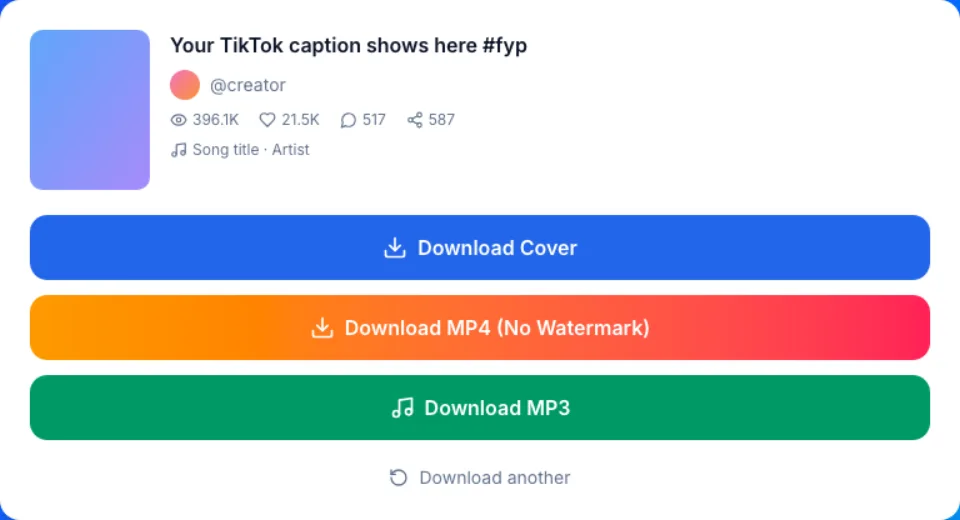
Paste the link into the box above and press Get Thumbnail. The result shows the cover next to the caption, @author and play count, so you can see it is the right video.
- 3
Press Download Cover
The cover is the first button in the result. Your browser saves it as a JPG that the TikTok thumbnail downloader normally fetches straight from TikTok, with our server as a fallback that keeps nothing.
What this TikTok cover downloader saves
One image per post: the cover TikTok shows in profile grids and search results.
The original file, not a screen grab
You get the JPG TikTok itself serves as the cover. No play button, captions or like icons in the frame, and no new compression from us.
Size follows the video
A vertical video's cover came out as a 540x960 JPG in our checks. Other videos give other sizes. We never upscale it to look bigger.
The frame the creator picked
Creators choose their cover when they post, often with a text hook on it. That chosen image is what you save, text and all.
Photo posts have covers too
Paste a slideshow link and the result offers its cover as well as every photo of the post.
Video and sound from the same paste
The TikTok thumbnail downloader also lists the MP4 without watermark and the sound as an MP3 below the cover button. No need to paste the link twice.
Download a TikTok thumbnail, screenshot it, or pause the video?
Three ways to end up with a still image of a TikTok, side by side.
| Download Cover here | Screenshot in the app | Still from the saved MP4 | |
|---|---|---|---|
| What you get | The cover image TikTok stores | Whatever is on your screen | Any moment you pause on |
| Size | As TikTok serves it, 540x960 in our test | Your screen's size and shape | The video's own size |
| App interface in the frame | None | Buttons, caption, progress bar | None |
| Which frame | Only the creator's chosen cover | The one you catch | Your choice |
| Steps | Paste a link, one tap | Crop and clean up by hand | Save the video, then export a frame |
| Best for | The exact cover as posted | A quick reference | A different moment than the cover |
Who uses a TikTok thumbnail downloader
A cover is small, but it is the first thing anyone sees of a video.
Creators keeping their own covers
Save the covers you posted next to your edits, so you can reuse a design or remember which frame you chose for a series.
Planning a profile grid
Line up your last covers in a design app to see how they sit together before you choose the next one.
Social media managers
Drop campaign covers into client reports and decks instead of cropping screenshots from a phone.
Hook research
Collect covers from a niche to compare text hooks, fonts and framing in one folder.
Newsletters and blog posts
Show the cover next to a TikTok link in an email or article, where a plain image is simpler than an embedded player. Credit the creator.
Teaching and talks
Put covers on slides about short-form video and keep them offline for the day you present.
TikTok cover downloader or thumbnail downloader: same image
On TikTok, the cover and the thumbnail are the same thing: the still image that stands for a video in profile grids, search results and share previews. People search for both names, and this TikTok thumbnail downloader saves that one file.
The cover is not always the first frame. When posting, a creator can slide through the clip and pick any frame, and add text on top. TikTok then publishes that one image for the post. There is no second cover and no set of alternative frames to choose from. If you want a different moment, save the video and pause on it.
Why a TikTok thumbnail download fails, and the fix
Mistake: Pasting a profile link like tiktok.com/@name
Do this instead: Open the video itself and copy its link. For the account's round photo, use the profile picture downloader instead.
Mistake: Pasting a link to a private, deleted or region-blocked video
Do this instead: Those posts show a clear error. Only public posts have a cover anyone outside the account can reach.
Mistake: Expecting a 1080x1920 cover
Do this instead: The cover comes in the size TikTok serves for it, 540x960 in our test. For a still at the video's own size, save the video (HD when it is offered) and take a frame from it.
Mistake: Looking for a moment that is not the cover
Do this instead: A post has only one cover. Download the MP4 from the same result and pause or export the frame you want.
Mistake: Screenshotting the cover from a profile grid
Do this instead: The grid trims each cover and puts the view count on top. Paste that video's link here to save the whole cover instead.
Cost, privacy and limits
Free and unlimited
Every cover you save with the TikTok thumbnail downloader is free, and so are videos and MP3s. There is no download cap, no account and nothing to install.
Nothing kept on our side
Nothing you download is ever saved on our servers. The cover normally downloads in your browser straight from TikTok; if that fails, our server streams it to you without saving it.
Public posts only
We read only what TikTok shows to anyone. No login is ever asked for. This site is not affiliated with TikTok or ByteDance.
The cover belongs to the creator
Save covers of your own videos freely. For anyone else's, ask before you publish it and credit the creator.