
TikTok to MP3
TikTok to MP3 in one paste: save the sound of any public video or slideshow as an MP3 file. Free, unlimited, no app and no sign-up.
What you get
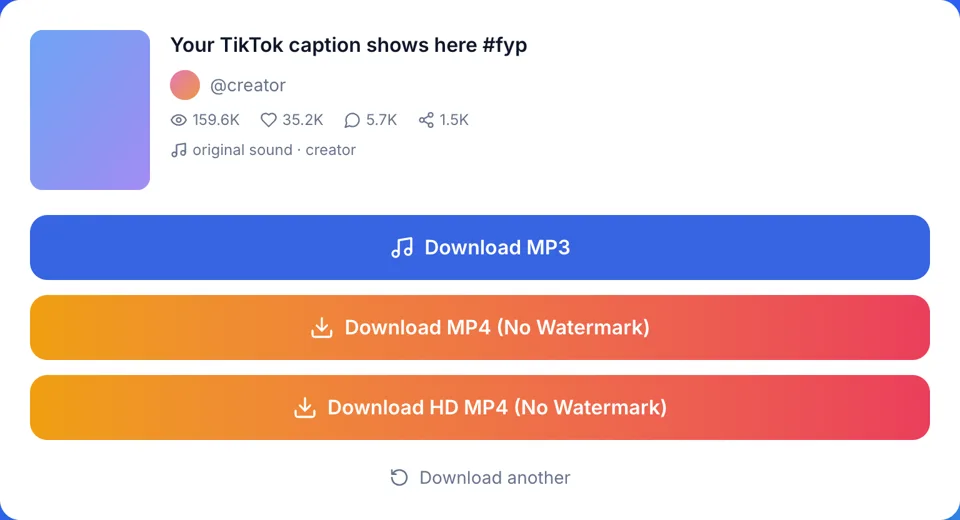
How to convert TikTok to MP3
Three steps, the same on a phone and a computer.
- 1
Copy the post link
In the TikTok app, tap Share on the video or slideshow and choose Copy link. On a computer, copy the address bar. Short vm.tiktok.com, vt.tiktok.com and tiktok.com/t/ links work too.
- 2
Paste and press Convert to MP3
Paste the link into the box at the top of this page. A result card appears with the cover, the caption, the @author and the name of the sound.
- 3
Check the sound name, then save
If the sound name is the one you want, tap Download MP3. The file lands in your browser's downloads folder.
Why use this TikTok audio downloader
The post's own sound file
Your browser normally fetches the audio file behind the sound name from TikTok and, when it isn't an MP3 already, converts it on your device. If that fails, our server fetches or converts it instead and keeps nothing. It is not a recording of your screen, so there are no taps, notifications or room noise in it.
Slideshows have a sound too
A photo post's MP3 is its background song. Paste the slideshow link and the MP3 button is the first one on the card, above the photos.
You see the sound name first
The result card names the sound and who made it before you download, so you know if you have the right track.
Free, unlimited, any browser
This TikTok to MP3 tool needs no account, app or extension, and has no daily cap. It runs in Safari, Chrome and other mobile and desktop browsers.
TikTok to MP3 vs other ways to keep a sound
Four ways people try to download TikTok audio, by type.
| This page | Add to Favorites in TikTok | Screen recording | Video editor audio export | |
|---|---|---|---|---|
| You get a file | Yes, an MP3 | No, it stays in the app | Yes, a video | Yes, after export |
| Plays outside TikTok | Most music players | No | Video player only | Yes |
| Clean audio | The sound file itself | Yes, in the app | Picks up taps and alerts | Depends on the import |
| Slideshow songs | Yes | Yes | Yes, while it plays | Only if the editor imports photo posts |
| Account needed | No | TikTok account | No | Often |
| Steps | Paste a link | Two taps | Record, trim, convert | Import, cut, export |
What people do with a TikTok audio download
Once you turn a TikTok to MP3, the file plays offline in most music players.
Listen offline
Keep a song, a comedy bit or a short talk on your phone for a flight or a commute without data.
Keep a sound before it goes
Creators delete posts and set them to private. Save the MP3 while the post is public and the file stays on your device.
Practice a dance
Loop the exact clip a trend uses in your music player, at home or in a studio.
Edit your own video
Line up a sound you are allowed to use in your editing app before you film, then post with it on TikTok.
Keep your own voiceovers
Creators who recorded a voiceover or song themselves can keep an MP3 of a post's sound. If the post uses a library song, the MP3 may be that song, so keep the MP4 for your voice.
What a TikTok MP3 contains
Every TikTok post points to a sound: the name shown at the bottom of the video, with a spinning record icon. That sound is a separate audio file, and it is what we convert. For slideshows it is the song that plays behind the photos.
The name tells you what you will get. "original sound" followed by a creator's name means that person uploaded their own audio, often their voice over music. A song title and artist means the creator picked a track from TikTok's music library, and you get the clip TikTok holds for it.
If the card shows a library song's title, the MP3 is that song as TikTok holds it, even when the creator talks over it in the video. When a video has no separate sound file, we take the video's own audio track instead.
TikTok audio download problems and fixes
Most failed TikTok to MP3 attempts come down to one of these.
Mistake: Pasting a link to a private or deleted post
Do this instead: Only public posts can be read. A private, deleted or region-blocked post shows an error that says so; a message asking you to wait or saying the service is unavailable is temporary, so try again shortly.
Mistake: Expecting the voiceover from a post that uses a library song
Do this instead: The MP3 is the post's sound. Check the name on the card: a song title means you get the song.
Mistake: Tapping Add to Favorites and expecting a file
Do this instead: Favorites only saves the sound inside your TikTok account. For an MP3 on your device, copy the post link and paste it here.
Mistake: Coming back to the card an hour later
Do this instead: Download links can expire. If a download fails after waiting, paste the TikTok link again to refresh it.
Mistake: Putting a licensed song in a YouTube video or an ad
Do this instead: Music on TikTok is often licensed for TikTok only. Get the rights holder's permission before reusing it outside personal use.
Free TikTok MP3 downloads, no catch
Free with no limits
Every MP3, video and photo download is free. No sign-up, no app, no extension and no daily cap.
Nothing kept
Nothing you download is ever saved on our servers. When a sound needs converting, your browser normally does it; if it can't, our server converts it and keeps nothing.
Your permission, your call
We are not affiliated with TikTok or ByteDance. Download only sounds you own or have permission to use, for personal use.